Black Friday tech toys span coding kits, remote-control creatures, flying toys, and active-play systems, so the right pick depends on whether a child wants to build, program, or jump into play. I’d name the ELEGOO UNO R3 Smart Robot Car Kit V4 with Camera best overall for its mix of building and coding, while the Smartivity Robotic Mechanical Hand is a hands-on STEM standout and the Nex Playground suits families looking for movement-based play. The main tradeoff is between toys that teach through assembly and practice and toys that deliver simpler, faster entertainment. Age, adult setup time, play space, and whether batteries or charging are part of the routine can change which option makes sense. Read on for the full breakdown, buying advice, and picks matched to different play styles.

Get decor and gifts delivered free with Prime
- Fast, free delivery on millions of items
- Prime Video, Amazon Music and more included
- Member-only deals all year
Complete the kit


Key Takeaways
- Building and coding offer the most room to grow: The ELEGOO UNO R3 kit, Teach Tech Mech-5, and Raqivudo kit put assembly and problem-solving ahead of instant play, making them better fits for patient learners than quick-action toys.
- Not every STEM toy needs a screen or code: Smartivity’s mechanical hand centers on a physical mechanism, while Thames & Kosmos My Robotic Pet adds coding to a character-led project.
- Remote-control fun varies by setting: The wall-crawling geckos and Explodapede emphasize visual stunts, while the ETPlanet UFO needs open space and a steadier hand.
- Rechargeable designs reduce disposable-battery hassle, but not setup: Several handheld and remote-control toys recharge, yet charging time and keeping track of controllers still affect everyday use.
- Family play and solo projects serve different needs: Nex Playground is aimed at active group play; construction kits and the handheld cube game are more naturally suited to individual or small-group sessions.
| ELEGOO UNO R3 Smart Robot Car Kit V4 with Camera |  | Best for Aspiring Programmers | Controller: UNO R3 | Camera and Wi-Fi module: ESP32-WROVER-based | Sensors: Line-tracking and ultrasonic | VIEW LATEST PRICE | See Our Full Breakdown |
| Xinbeiya Rechargeable Handheld Cube Game |  | Best for Portable Head-to-Head Play | Age range: 6–12+ years | Game types: Speed, memory, and creativity | Number of players: 1–2 | VIEW LATEST PRICE | See Our Full Breakdown |
| EduCuties Rechargeable Programmable Robot Toy with Remote and Gesture Control |  | Best for Younger Robot Fans | Model: EC22-5R | Material: ABS plastic | Controls: Infrared remote and hand gestures | VIEW LATEST PRICE | See Our Full Breakdown |
| HEX BOTS Explodapede Remote Control Robotic Centipede Toy |  | Best for Silly Surprise Play | Model: 6077835 | Recommended age: 4 years and up | Control: Remote control or autonomous mode | VIEW LATEST PRICE | See Our Full Breakdown |
| Teach Tech Mech-5 STEM Coding Robot Building Kit for Kids Ages 10+ |  | Best Mechanical Coding Project | Model: TTC-895 | Recommended age: 10 years and up | Programming method: Coding buttons attached to a mechanical coding wheel | VIEW LATEST PRICE | See Our Full Breakdown |
| LECPOP 5-in-1 STEM Building Blocks Kit with RC Sports Car and Transforming Robot, 591 Pieces |  | Best Build-and-Drive Bundle | Brand: LECPOP | Model: 8042 | Pieces: 591 | VIEW LATEST PRICE | See Our Full Breakdown |
| HEX BOTS Glow-in-the-Dark Wall Crawler Gecko Remote Control Toy |  | Best Glow-in-the-Dark Crawler | Brand: HEXBUG | Model: 6075822 | Age range: 4 years and up | VIEW LATEST PRICE | See Our Full Breakdown |
| Raqivudo STEM Robot Coding Building Kit |  | Best for Guided Coding Projects | Brand: Raqivudo | Guided projects: 24 | Electronic modules: 8 | VIEW LATEST PRICE | See Our Full Breakdown |
| Thames & Kosmos My Robotic Pet: Coding Chameleon Robotics Kit |  | Best Screen-Free Robotics Toy | Brand: Thames & Kosmos | Model number: 620507 | Product type: Robotics kit | VIEW LATEST PRICE | See Our Full Breakdown |
| HEX BOTS Wall Crawler Gecko Rechargeable Remote Control Toy |  | Best Simple Remote-Control Toy | Brand: HEX BOTS | Model number: 6071514 | Age range: 4 years and up | VIEW LATEST PRICE | See Our Full Breakdown |
| Nex Playground Active Play System for Kids and Families | 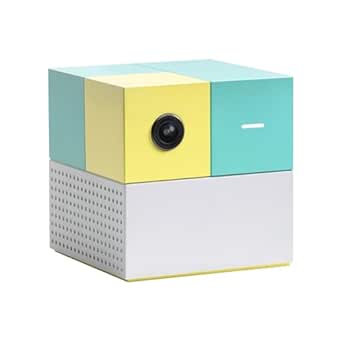 | Best for Group Play | Players: Up to 4 | Control: Built-in camera; no controller required | Connection: HDMI | VIEW LATEST PRICE | See Our Full Breakdown |
| Pedillux Interactive Robot Dog Toy with Remote Control and Voice Commands |  | Best for Voice-Controlled Robot Play | Model: 2850 | Control: 2.4GHz remote and voice commands | Actions: More than 30 | VIEW LATEST PRICE | See Our Full Breakdown |
| Smartivity Robotic Mechanical Hand STEM Toy for Kids Ages 8–14 |  | Best Screen-Free STEM Build | Model: SMRT1135 | Age range: 8–14 years | Theme: Anatomy and robotics | VIEW LATEST PRICE | See Our Full Breakdown |
| ETPlanet Hand-Controlled UFO Flying Drone with LED Lights, Blue |  | Best Compact Indoor Flyer | Model: TSM005-B | Color: Blue | Control: Gesture control with motion sensors | VIEW LATEST PRICE | See Our Full Breakdown |
| Ruko 18011 Interactive Robot Dog Toy with LED Expressions |  | Best for Programmable Robot Routines | Model: 18011-Black Gold | Age range: 3 years and up | LED expressions: 30 | VIEW LATEST PRICE | See Our Full Breakdown |
| Black Friday tech toy | Recommended age | Model |
|---|---|---|
| ELEGOO UNO R3 Smart Robot Car | 12 years and up | — |
| Xinbeiya Rechargeable Handheld | — | — |
| EduCuties Rechargeable Program | 3 months to 10 years | EC22-5R |
| HEX BOTS Explodapede Remote Co | 4 years and up | 6077835 |
| Teach Tech Mech-5 STEM Coding | 10 years and up | TTC-895 |
| LECPOP 5-in-1 STEM Building Bl | 6 years and up | 8042 |
| HEX BOTS Glow-in-the-Dark Wall | — | 6075822 |
| Raqivudo STEM Robot Coding Bui | 6 years and up | — |
| Thames & Kosmos My Robotic Pet | 8–12 years; adult assembly help for ages 8 and up, independent assembly suggested from age 12 | — |
| HEX BOTS Wall Crawler Gecko Re | — | — |
| Nex Playground Active Play Sys | 5 years and up | — |
| Pedillux Interactive Robot Dog | 6 years and older | 2850 |
| Smartivity Robotic Mechanical | — | SMRT1135 |
| ETPlanet Hand-Controlled UFO F | 6 years and up | TSM005-B |
| Ruko 18011 Interactive Robot D | — | 18011-Black Gold |
More Details on Our Top Picks
ELEGOO UNO R3 Smart Robot Car Kit V4 with Camera
For a Black Friday tech toy that can grow from a build project into a coding hobby, the ELEGOO UNO R3 is the most technically ambitious pick in this group. Builders assemble the car, then use the Arduino IDE and example programs to explore line tracking, ultrasonic obstacle avoidance, and auto-follow behavior. Its camera and Wi-Fi module add FPV video, while app and IR controls give beginners ways to operate it before they write their own code. Compared with the Teach Tech Mech-5, this kit leans more on sensors, software, and remote viewing; the Mech-5 is more focused on mechanical actions and a coding wheel. The tradeoff is a longer setup path: assembly and programming are required, and younger builders may need adult help. It suits kids ready for a project, not anyone seeking instant play.
Pros:- Arduino compatibility and example programs give learners a path from guided projects to their own code.
- Camera-based FPV, app control, and an IR remote offer several ways to interact with the car.
- Line-tracking and ultrasonic sensors support practical robotics experiments.
- Rechargeable battery and keyed connectors are included, helping limit extra purchases and wiring errors.
Cons:- Assembly and programming are necessary before the full feature set is usable.
- First-time builders may need adult guidance to handle the build and coding steps.
- The technical focus may be less appealing to children who prefer imaginative, immediate play.
Best for: Ages 12 and up who want to assemble a robot car and learn Arduino programming, sensors, and remote control with adult support available.
Not ideal for: Younger children or gift buyers seeking a ready-to-play robot that needs little assembly or programming.
- Controller:UNO R3
- Camera and Wi-Fi module:ESP32-WROVER-based
- Sensors:Line-tracking and ultrasonic
- Battery:2000 mAh rechargeable lithium-ion
- Control:App and IR remote
- Functions:FPV video, line tracking, obstacle avoidance, auto follow
- Dimensions:8 x 7 x 6 inches
- Recommended age:12 years and up
Our verdict“Choose the ELEGOO if the gift should teach real coding and sensor-based robotics, and skip it if you want a toy that works straight out of the box.”
Xinbeiya Rechargeable Handheld Cube Game
The Xinbeiya Handheld Cube Game is the easiest pick here to pack for a trip or bring out for a quick challenge: it measures just 2.75 inches per side and supports solo or two-player play. Speed, memory, and creativity modes give it more variety than a single-action remote-control toy such as the HEX BOTS Explodapede, though the cube offers less physical movement and no build project. Its score display and PK mode make friendly competition straightforward, while adjustable volume and customizable lights help tailor play to the setting. The tradeoff is a compact interface that may be awkward for smaller hands, plus a defined selection of eight games rather than an open-ended activity system. I’d pick it for short bursts of screen-free competition, not for a child expecting a complex game library or a robot to drive around.
Pros:- Combines speed, memory, and creativity games in one handheld device.
- Supports solo play and two-player competition with score tracking.
- Built-in rechargeable battery and included USB cable avoid disposable batteries for the game unit.
- Adjustable volume, lights, and music modes offer some control over the play experience.
Cons:- The 2.75-inch cube may be difficult for some players to grip or operate comfortably.
- The listed selection is limited to three speed games, three memory games, and two creativity games.
- It offers less hands-on building or moving play than the robot kits and remote-control toys in this roundup.
Best for: Families with children ages 6 and up who want a small, rechargeable game for quick solo challenges or two-player play while traveling.
Not ideal for: Children who prefer building, physical robot movement, or a broad range of game modes; the cube is small and offers eight listed games.
- Age range:6–12+ years
- Game types:Speed, memory, and creativity
- Number of players:1–2
- Dimensions:2.75 × 2.75 × 2.75 inches
- Power:Built-in rechargeable battery
- Volume modes:Loud, medium, low, mute
- Features:Score display, PK mode, customizable lights, music modes
- Warranty:1 year
Our verdict“Pick this cube for compact, rechargeable two-player challenges, but choose a robot or building kit if you want a more hands-on tech project.”
EduCuties Rechargeable Programmable Robot Toy with Remote and Gesture Control
The EduCuties programmable robot puts several kinds of interaction within reach: children can steer it with an IR remote, guide it with gestures, or set up a sequence of as many as 50 actions. Walking, dancing, singing, speaking, and obstacle avoidance keep it more immediately playful than the ELEGOO UNO R3, which asks builders to assemble and program a robot car. The EduCuties model also charges by USB, making it simpler to keep ready for play without swapping disposable batteries. Its tradeoff is runtime: a charge takes about two hours for roughly one hour of play, and its compact body has less presence than a larger robot. The advertised age range is broad, so I’d match it to a child who enjoys simple controls and repeatable routines rather than assume every listed feature suits every age.
Pros:- Offers both infrared remote and hand-gesture control.
- Can record and replay sequences of up to 50 user-selected actions.
- Movement, dance, sound, patrol, and obstacle avoidance provide varied play options.
- USB rechargeable design avoids disposable batteries for the robot.
Cons:- Around two hours of charging provides about 60 minutes of play.
- Its compact size may feel less substantial than larger robot toys.
- It offers less hands-on construction and coding depth than the ELEGOO UNO R3 or Teach Tech Mech-5.
Best for: Children who enjoy interactive movement and simple action programming, especially families looking for remote and gesture controls in one rechargeable toy.
Not ideal for: Older children seeking a substantial robotics build or extended play sessions; this toy has about 60 minutes of playtime per charge and a small body.
- Model:EC22-5R
- Material:ABS plastic
- Controls:Infrared remote and hand gestures
- Programmable actions:Up to 50
- Charging:USB rechargeable
- Charging time:About 2 hours
- Playtime:About 60 minutes
- Dimensions:10.6 x 5.9 x 3.3 inches
- Recommended age:3 months to 10 years
Our verdict“Choose EduCuties for accessible interactive robot play and simple programmed routines, rather than a longer-term robotics construction project.”
HEX BOTS Explodapede Remote Control Robotic Centipede Toy
The HEX BOTS Explodapede is the most spectacle-driven pick in this batch: it collapses into a ball, pops open, and slithers with glowing LED eyes. That novelty gives it a different kind of appeal from the Xinbeiya Handheld Cube Game, which is built around repeatable score-based challenges, and from the Teach Tech Mech-5, which rewards time spent building. With remote control or autonomous movement, children can either direct the centipede or let it roam on its own. This is a simple play-first toy, not a coding lesson or construction project. Its main catch is easy to miss when wrapping a gift: the robot charges by USB-C, but the remote needs two AAA batteries that are not included. I’d choose it for a child who enjoys comic, creature-like movement and skip it for buyers seeking programmable behavior or a deeper activity.
Pros:- Collapsible body pops open into a slithering centipede for a distinctive play moment.
- Remote control and autonomous mode give children two ways to operate it.
- USB-C rechargeable main toy avoids disposable batteries for the centipede itself.
- Glowing LED eyes add a clear visual feature during play.
Cons:- The remote requires two AAA batteries, which are not included.
- Its focus is movement and novelty rather than coding, building, or varied game modes.
- The supplied product information does not specify runtime or charging time.
Best for: Children ages 4 and up who enjoy creature-themed toys, pop-open action, and easy remote or autonomous movement.
Not ideal for: Gift buyers wanting a build-and-code project or a complete ready-to-play set without needing separate remote batteries.
- Model:6077835
- Recommended age:4 years and up
- Control:Remote control or autonomous mode
- Movement:Forward, reverse, and turning
- Charging:USB-C rechargeable
- Remote batteries:2 AAA batteries, not included
- Included components:Explodapede toy, remote control, charging cable
- Features:Collapsible design, pop-open action, glowing LED eyes
Our verdict“Choose the Explodapede for an amusing, movement-focused tech toy, but look elsewhere for programming depth or a gift that needs no extra batteries.”
Teach Tech Mech-5 STEM Coding Robot Building Kit for Kids Ages 10+
The Teach Tech Mech-5 turns coding into a physical sequence: builders attach buttons to a mechanical wheel to direct the robot through actions such as moving, rotating, lifting, kicking, throwing, and drawing. That makes it a strong Black Friday choice for a child who likes the process of building as much as the finished toy. Compared with the ELEGOO UNO R3, Mech-5 avoids a computer-based Arduino setup and focuses on tangible mechanical programming; the ELEGOO offers more sensor-led features, including FPV and obstacle avoidance. The price of that hands-on approach is time: assembly takes multiple hours, and the kit is designed for ages 10 and up. It also lacks the instant remote-controlled play of the EduCuties robot. I’d choose Mech-5 for a patient maker, not for a child who wants a robot ready to go on opening day.
Pros:- Mechanical coding wheel makes programmed sequences visible and hands-on.
- Robot actions include forward and backward movement, 360-degree rotation, throwing, lifting, kicking, and drawing.
- Step-by-step English instructions guide the assembly process.
- Combines construction, problem solving, and introductory coding in one project.
Cons:- Assembly takes multiple hours before the robot is ready for programmed play.
- The age recommendation of 10 years and up rules it out for younger builders.
- Its button-based mechanical programming is less sensor-rich than the ELEGOO UNO R3.
Best for: Kids ages 10 and up who enjoy assembling mechanisms and learning basic sequencing through physical coding controls.
Not ideal for: Younger children or anyone seeking a quick-to-use remote-control robot; assembly takes multiple hours and is part of the activity.
- Model:TTC-895
- Recommended age:10 years and up
- Programming method:Coding buttons attached to a mechanical coding wheel
- Robot actions:Forward and backward movement, 360-degree rotation, throwing, lifting, kicking, and drawing
- Educational skills:Coding, concept development, construction, problem solving, and STEM
- Included components:Assembly parts and English instruction manual
- Number of items:1
- Warranty:1 year against manufacturer defects
Our verdict“Pick Mech-5 for a child who wants a substantial mechanical build and physical coding, not an instant-play robot.”
LECPOP 5-in-1 STEM Building Blocks Kit with RC Sports Car and Transforming Robot, 591 Pieces
Five build options give this set a longer play arc than a single-purpose RC toy: children can assemble a sports car, robot, action figure, battle vehicle, and another model, then control four of them through an app or remote. Driving, navigation, gyro, and beginner programming modes add variety after construction, while the robot’s movable joints bring more posing play than the wall-crawling HEX BOTS geckos offer. Its 591 pieces also make it a more involved project than those geckos, so younger builders may need help with assembly. The tradeoff is that the fifth model lacks app and remote control, and the controller needs three AAA batteries that are not included. For a Black Friday tech toy meant to combine making and remote-controlled play, this is a stronger fit than a ready-to-run novelty, but it asks for more setup.
Pros:- Five possible builds extend play beyond a single finished model.
- Four models support app and remote control.
- Driving, navigation, gyro, and programming modes offer varied ways to play.
- The robot has flexible, movable joints for posing.
Cons:- One of the five models does not support app or remote control.
- The remote controller requires three AAA batteries, not included.
- The 591-piece build may need adult help for younger children.
Best for: Families with children ages 6 and up who want a multi-session building project that turns into several app- or remote-controlled vehicles and robots.
Not ideal for: Shoppers seeking an immediately playable toy or a simple build; the 591-piece assembly takes time, and the controller needs separate AAA batteries.
- Brand:LECPOP
- Model:8042
- Pieces:591
- Build options:5 models
- Control support:App and remote control for 4 models
- Control modes:Gyro control, driving simulation, navigation path, remote control, programming
- Rechargeable battery:3.7V/400mAh lithium battery
- Controller batteries:3 AAA batteries, not included
- Recommended age:6 years and up
Our verdict“Choose this kit for a child who enjoys building as much as driving, and pick a HEX BOTS gecko instead for quicker, simpler remote-control fun.”
HEX BOTS Glow-in-the-Dark Wall Crawler Gecko Remote Control Toy
The glow-in-the-dark finish and LED eyes give this gecko a visual hook the standard HEX BOTS Wall Crawler Gecko lacks. Both models crawl on floors and climb walls, but this 12-inch version is the more theatrical pick for dim rooms and after-dark play. Its all-direction remote works from up to 25 feet, and the gecko itself recharges by USB, avoiding the need to replace batteries in the toy. That does not make it fully ready out of the box: the remote needs two AAA batteries, which are not included. Compared with the LECPOP building kit, this is far less about construction or coding and much more about immediate movement and visual novelty. The hard plastic body and silicone limbs and tail give it a mix of rigid structure and flexible appendages, though buyers should note that no manufacturer warranty is listed.
Pros:- Climbs walls and moves across floors under remote control.
- Glow-in-the-dark styling and LED eyes stand out in dim rooms.
- The gecko recharges by USB with the cable included.
- Silicone limbs and tail add flexible movement.
Cons:- The remote requires two AAA batteries, not included.
- No manufacturer warranty is listed.
- Its play centers on remote-controlled movement rather than building or programming.
Best for: Families with children ages 4 and up who want a visually striking, ready-to-drive crawler for floor and wall play.
Not ideal for: Buyers who want a building or coding activity, or who prefer a toy with a stated manufacturer warranty and all remote batteries included.
- Brand:HEXBUG
- Model:6075822
- Age range:4 years and up
- Remote range:Up to 25 ft (8 m)
- Length:12 inches
- Materials:Hard plastic body; silicone limbs and tail
- Lighting:Glow-in-the-dark design; LED eyes
- Charging:USB cable included
- Remote batteries:2 AAA batteries required, not included
Our verdict“Pick this over the standard HEX BOTS gecko for glow effects, but choose a STEM kit if building and coding matter more than creature play.”
Raqivudo STEM Robot Coding Building Kit
Twenty-four guided projects make this the most structured coding-and-building option in this group. Its modular parts, two motors, infrared sensor, and other electronic modules support robots and mechanical builds, while the Scratch-based app lets children program movement, lights, sounds, and sensor responses. That gives it a broader learning focus than the LECPOP set, whose appeal leans more toward assembling several remote-controlled models. The included bubble module also adds a playful payoff beyond basic driving or obstacle response. The tradeoff is dependence on a compatible iOS or Android phone or tablet; families looking for screen-free interaction may prefer the Thames & Kosmos Coding Chameleon, which uses physical action cards. Battery details are not specified, so I would check what power is needed before treating it as a ready-to-start gift.
Pros:- Twenty-four guided projects give builders a clear path through varied activities.
- Scratch-based drag-and-drop coding controls movement, lights, sounds, and sensor responses.
- Eight electronic modules support sensor-driven builds and mechanical projects.
- A programmable bubble module adds a playful project beyond standard robot movement.
Cons:- Programming requires a compatible iOS or Android phone or tablet.
- The product information does not specify whether batteries are included.
- The app-based approach is less suitable for families seeking screen-free coding.
Best for: Children ages 6 and up who enjoy following structured projects and want to explore app-based block coding with sensors and motors.
Not ideal for: Families without a compatible iOS or Android phone or tablet, or buyers who want clear battery-in-the-box details before gifting.
- Brand:Raqivudo
- Guided projects:24
- Electronic modules:8
- Included electronics:Programmable controller, 2 motors, infrared sensor, lamp, color light, speaker, bubble module
- Coding:Scratch-based drag-and-drop app
- App compatibility:Compatible iOS and Android phones and tablets
- Recommended age:6 years and up
- Manufacturer part number:2251J
Our verdict“Choose this over the LECPOP kit when guided app-based coding and sensor projects matter more than a collection of remote-controlled builds.”
Thames & Kosmos My Robotic Pet: Coding Chameleon Robotics Kit
Physical action-card coding is the main reason to choose this chameleon over the Raqivudo kit: children can build a sequence without needing a phone or tablet. After assembly, three modes—Coding, Wild, and Pet—shift the play between programmed actions, sensor responses, and interactive behavior. Color and infrared sensors, RGB LEDs, articulated joints, and a moving tongue make the 15-inch model feel more like a robotic pet than a conventional vehicle-building kit. Its 48-page manual also introduces robotics and biomimicry, adding learning context to the build. The tradeoff is age and setup: children 8 and up need adult help with assembly, while independent assembly is suggested for ages 12 and up. Batteries are recommended but are not listed among the included components, so this is less straightforward as an out-of-box gift than the rechargeable HEX BOTS geckos.
Pros:- Physical action cards support screen-free programming.
- Coding, Wild, and Pet modes offer different kinds of interaction.
- Color and infrared sensors pair with RGB LEDs for responsive behavior.
- The articulated body and moving tongue add animal-like motion.
Cons:- Assembly for ages 8 and up requires adult help; independent assembly is suggested for ages 12 and up.
- Batteries are recommended but are not listed among the included components.
- Its 15-inch assembled form is a more involved project than a ready-to-play remote-control toy.
Best for: Families seeking a screen-free robotics project for children ages 8 and up, especially those who enjoy animal-inspired builds and hands-on sequencing.
Not ideal for: Younger children expecting to build independently, or gift-givers who want a clearly specified battery-included toy that is ready to run.
- Brand:Thames & Kosmos
- Model number:620507
- Product type:Robotics kit
- Length:15 inches
- Play modes:Coding, Wild, Pet
- Sensors:Color sensor, infrared sensor
- Lighting:RGB LEDs
- Manual:48 pages
- Recommended age:8–12 years; adult assembly help for ages 8 and up, independent assembly suggested from age 12
Our verdict“Choose the chameleon over the Raqivudo kit for screen-free, animal-themed coding, provided an adult can help with assembly.”
HEX BOTS Wall Crawler Gecko Rechargeable Remote Control Toy
This is the straightforward wall-climbing pick for children who want to steer a creature rather than build one. The 14-inch gecko crawls across floors and climbs walls, with LED eyes and silicone limbs and tail; its remote controls movement in all directions from up to 25 feet away. Compared with the glow-in-the-dark HEX BOTS gecko, this version is longer at 14 inches and skips the glow finish, making it the plainer choice between the two. Both recharge by USB and both need separate AAA batteries for the remote. Unlike the LECPOP and Raqivudo kits, there is no construction or coding activity here, which keeps the play more immediate but gives it less project depth. The main practical snag is simple: the remote’s two AAA batteries are not included.
Pros:- Climbs walls as well as crawling across floors.
- Full-function remote controls movement in all directions from up to 25 feet.
- The gecko recharges with the included USB cable.
- Silicone limbs and tail add flexible detail to its movement.
Cons:- The remote requires two AAA batteries, not included.
- It offers no building or coding activity compared with the STEM kits.
- It lacks the glow-in-the-dark design of the other HEX BOTS gecko in this roundup.
Best for: Children ages 4 and up who want an easy-to-understand remote-control toy that can crawl across floors and climb walls.
Not ideal for: Children seeking a build-and-code challenge, or buyers who want glow-in-the-dark styling and a more distinctive visual effect.
- Brand:HEX BOTS
- Model number:6071514
- Age range:4 years and up
- Remote range:Up to 25 ft (8 m)
- Length:14 inches
- Materials:Hard plastic body; silicone limbs and tail
- Features:Wall climbing, LED eyes, full-function remote control
- Charging:USB cable included
- Remote batteries:2 AAA batteries, not included
Our verdict“Choose this for simple, rechargeable wall-crawling fun, or select the glow-in-the-dark HEX BOTS version if visual effects are the priority.”
Nex Playground Active Play System for Kids and Families
For a Black Friday tech toy that gets a group moving, the Nex Playground stands apart from the lineup: its camera tracks body movements, so up to four players can join in without holding controllers. The included mix of Fruit Ninja, Starri, Whac-a-Mole, Go Keeper, and Party Fowl gives families several ways to play right away, while HDMI connection makes it easy to use with a TV or projector. Compared with the ETPlanet Hand-Controlled UFO, this is built for shared play on a larger screen rather than taking turns flying a small toy. The tradeoff is ongoing content: access to the full catalog and new monthly games requires a separate Play Pass. It also needs an indoor screen setup, so it is less flexible than a portable robot or drone.
Pros:- Camera-based motion control lets players move without holding controllers.
- Supports up to four players at once.
- Includes five games and connects to a TV or projector through HDMI.
- Compact unit is easy to bring to playdates; content is described as ad-free and kidSAFE+ COPPA certified.
Cons:- A separate Play Pass is required for the full game catalog and monthly additions.
- Designed for indoor use and depends on a TV or projector.
Best for: Families with children aged five and up who want active, screen-based group games for a TV room or playdate.
Not ideal for: Buyers seeking outdoor play, a standalone handheld toy, or a full game library without a separate subscription.
- Players:Up to 4
- Control:Built-in camera; no controller required
- Connection:HDMI
- Storage:64 GB
- Included games:Fruit Ninja, Starri, Whac-a-Mole, Go Keeper, Party Fowl
- Recommended age:5 years and up
- Use:Indoor
- Play Pass:3-month or 12-month subscription sold separately
Our verdict“Choose the Nex Playground for active family game sessions, but skip it if you want a self-contained toy without subscription-dependent content.”
Pedillux Interactive Robot Dog Toy with Remote Control and Voice Commands
The Pedillux robot dog is a playful pick for children who want to give commands and watch a toy respond, rather than build or program one from scratch. It combines voice input with a 2.4GHz remote and offers more than 30 actions, including dancing and handstands; programmable sequences give kids a way to arrange familiar moves into routines. That makes it more performance-focused than the Smartivity Robotic Mechanical Hand, which centers on assembly and mechanical learning instead of interactive antics. The rechargeable battery and included USB cable avoid replacing batteries in the robot, though the remote still needs two AA batteries that are not included. Its five-minute inactivity shutdown saves power, but can interrupt play if a child pauses between commands.
Pros:- Offers both voice commands and 2.4GHz remote control.
- More than 30 actions and programmable sequences support varied routines.
- Rechargeable robot battery and USB charging cable are included.
- Automatic shutdown helps conserve battery when the toy is idle.
Cons:- The remote requires two AA batteries, which are not included.
- Automatic shutdown after five minutes of inactivity may interrupt longer pauses in play.
Best for: Children aged six and older who enjoy voice commands, repeatable robot routines, and remote-controlled character play.
Not ideal for: Families who want a build-it-yourself STEM activity, or buyers who prefer a remote that works without supplying separate batteries.
- Model:2850
- Control:2.4GHz remote and voice commands
- Actions:More than 30
- Programming:Programmable action sequences
- Robot battery:3.7V rechargeable
- Remote batteries:2 AA batteries, not included
- Materials:ABS plastic
- Recommended age:6 years and older
- Automatic shutdown:After 5 minutes of inactivity
Our verdict“Pick the Pedillux for command-driven robot antics, especially if your child values performance over a hands-on building project.”
Smartivity Robotic Mechanical Hand STEM Toy for Kids Ages 8–14
The Smartivity Robotic Mechanical Hand turns a tech-toy gift into a build-and-understand project: children assemble an engineered-wood hand by following step-by-step instructions, then explore how a mechanical design can imitate movement. Its appeal is different from the Pedillux robot dog, which delivers ready-to-play movement and voice responses; this kit asks for patience before the play begins, but gives the child a tangible construction task rather than another remote-controlled character. It is also a screen-free choice, a useful contrast with the Nex Playground and its TV-based games. The age range of eight to fourteen is a real boundary, and assembly may frustrate children who want instant action or need more help than the instructions provide. Lifetime replacement parts help with missing or damaged components.
Pros:- Step-by-step instructions guide the child through the build.
- Hands-on mechanical play encourages screen-free STEM learning.
- Engineered-wood construction offers a different feel from plastic remote toys.
- Lifetime replacement parts are included.
Cons:- The child must assemble the toy before using it.
- Its intended age range may exclude younger siblings or children who need a simpler build.
Best for: Curious children aged 8–14 who enjoy following instructions, building mechanisms, and screen-free STEM activities.
Not ideal for: Younger children or kids who want a toy that works straight out of the box without an assembly project.
- Model:SMRT1135
- Age range:8–14 years
- Theme:Anatomy and robotics
- Material:Engineered wood
- Dimensions:40.2 × 29 × 8.9 cm
- Pack count:1
- Build:DIY robotic mechanical hand
- Replacement parts:Lifetime replacement parts included
Our verdict“Choose this kit for an older child who would rather build a working mechanism than start playing with a remote toy immediately.”
ETPlanet Hand-Controlled UFO Flying Drone with LED Lights, Blue
The ETPlanet Hand-Controlled UFO is the most direct choice here for children who want a flying toy without learning traditional drone controls. Gesture sensing steers it through the air, while a flexible webbed PP shell helps shield hands and nearby furniture during indoor flights. Its 12 color-changing LEDs make movement easier to follow and give the toy a playful light show; compared with the Ruko 18011 robot dog, this offers aerial motion instead of programmed ground routines and LED expressions. The main compromise is playtime: a 35–45-minute charge yields just 6–10 minutes of flight, so sessions need frequent pauses. It is better suited to short rounds in a clear room than extended play or outdoor flying.
Pros:- Gesture control and motion sensors make flight approachable for young beginners.
- Flexible webbed shell helps protect hands, walls, and furniture.
- Twelve color-changing LED lights add visibility and visual appeal.
- Compact design includes a USB charging cable and battery.
Cons:- Flight lasts only 6–10 minutes per charge.
- Charging takes about 35–45 minutes, creating a long wait between short sessions.
Best for: Children aged six and up who want a simple, gesture-controlled flying toy for short indoor play sessions.
Not ideal for: Buyers who need long play sessions, outdoor flight, or a toy that does not require a lengthy recharge between turns.
- Model:TSM005-B
- Color:Blue
- Control:Gesture control with motion sensors
- Lights:12 color-changing LED lights
- Flight time:6–10 minutes
- Charging time:About 35–45 minutes
- Material:PP
- Recommended age:6 years and up
- Included components:Drone unit, battery, USB charging cable
Our verdict“Choose the ETPlanet for brief, supervised indoor flying fun, but pass if longer flight time is your priority.”
Ruko 18011 Interactive Robot Dog Toy with LED Expressions
For a child who wants a robot pet with a broader range of responses, the Ruko 18011 pairs touch interaction and remote control with 30 LED expressions, obstacle sensing, and programming for up to 50 actions. That gives it more room for custom routines than the Pedillux robot dog, whose listed action count exceeds 30 but whose standout feature is voice control. Ruko’s obstacle sensing can help it move around objects, and its stated playtime of up to 45 minutes supports longer sessions than the ETPlanet UFO’s short flights. The tradeoff is charging: a full recharge takes three hours, and the remote needs two AAA batteries that are not included. The charging cable also requires a USB-A power source; USB-C-to-USB-C charging is not supported.
Pros:- Combines remote and touch controls with sounds and movement.
- Displays 30 LED expressions and supports programming up to 50 actions.
- Obstacle sensing helps the robot move around objects.
- Provides up to 45 minutes of play per charge.
Cons:- A full charge takes about three hours.
- The remote requires two AAA batteries, which are not included.
- USB-C-to-USB-C charging is not supported.
Best for: Children aged three and up who enjoy interactive robot pets, expressive lights, and programming action sequences.
Not ideal for: Families who need quick charging, want voice-command control, or rely only on USB-C-to-USB-C charging.
- Model:18011-Black Gold
- Age range:3 years and up
- LED expressions:30
- Programmable actions:Up to 50
- Remote:2.4 GHz; range up to 98 ft
- Play time:Up to 45 minutes
- Charging time:3 hours
- Remote batteries:2 AAA batteries, not included
- Charging cable:USB-A to USB-C included; USB-C to USB-C not compatible
Our verdict“Pick the Ruko for a young child who wants expressive, programmable robot-pet play and can wait through its longer recharge.”
How We Picked
I ranked these Black Friday tech toys by the kind of play they support and how much lasting value that play may offer: building and coding depth, ease of starting, repeat-play potential, and how clearly the toy suits its stated audience. I also weighed practical details such as charging or battery needs, adult help during setup, space requirements, and whether a toy works best alone or with others. These factors matter because a toy that sounds exciting but is hard to start, awkward to store, or mismatched to a child’s age can see little use.
The ordering gives the lead position to options with a strong balance of hands-on engagement, learning or play variety, and a clear audience. Specialized picks rank lower when their appeal depends on a narrower interest, setting, or play style—not because they cannot be fun. Since this lineup ranges from build-it-yourself kits to active-play hardware, I compare each option against products serving a similar need rather than treating every feature set as interchangeable.
Factors to Consider When Choosing Black Friday Tech Toys
For Black Friday, I’d choose the kind of play first and use features as a filter. That prevents a common mistake: buying a toy for its headline capability when the child would rather build, move, compete, or play with a character.
Match the play style to the child
Ask what the child does when given free time: assemble things, follow challenges, move around, or invent stories. A coding kit can suit a curious builder but frustrate someone who expects a toy to work straight out of the box. A remote-control creature offers quicker action, though its novelty may depend on stunts and reactions rather than open-ended projects. Active-play systems ask for participation from more than one person and need the household to have room and interest for that. Choose the style the child already gravitates toward, not just the one that sounds most educational to an adult.
Check age guidance against patience and skill
Age labels are a starting point, not a guarantee that a child will enjoy the challenge. Fine-motor control, reading confidence, persistence, and willingness to troubleshoot can matter as much as age for construction and coding toys. A younger child may enjoy a more advanced kit with an adult alongside, while an older child may find a simple remote-control toy too limited. Think about whether the child likes following instructions or prefers immediate, unstructured play. Buying above a child’s current confidence can turn a gift into a project for the grown-up.
Estimate adult setup and support
Some tech toys ask for more than opening the box: assembly, pairing, charging, software steps, or help interpreting instructions may be part of the first session. Check the manufacturer’s setup details and included components before choosing, especially if the toy is meant to be a surprise. A kit with a satisfying build can justify extra adult time when the child wants to learn alongside someone. For independent play, simpler controls and a short path to the first activity may matter more than a long feature list. The common mistake is assuming that a child can manage every step alone because the product is labeled for kids.
Plan for space, surfaces, and storage
Flying toys, wall crawlers, and active-play systems call for different kinds of room. A drone needs clear space and a safe place to practice, while a wall-climbing toy depends on suitable surfaces and may be less useful in a crowded or delicate room. Building kits need a table and somewhere to keep small pieces between sessions. Consider noise, nearby breakables, pets, and siblings who may share the space. A toy that fits the home is more likely to get used than one that requires a special setup every time.
Compare power needs and upkeep
Rechargeable toys can cut down on replacing disposable batteries, but they still need charging and a predictable place to keep cables or controllers. Battery-powered toys may be easier to use when a spare set is on hand, though ongoing battery use can become a nuisance. For moving parts and build kits, check how the maker handles replacement pieces and care instructions. Think about whether the toy is likely to be used in short bursts or long sessions, since that changes how often charging interrupts play. A small amount of planning can prevent a toy from being unavailable when a child wants it.
Choose lasting engagement over feature count
A long list of modes does not guarantee that a child will return to the toy. Look for a repeatable challenge, room to create variations, or a way to share play with others. Kits can hold attention through building and later experimentation, while stunt toys may provide a faster burst of excitement with less room for new goals. Neither approach is automatically better; the right choice depends on whether the recipient prefers a project or a quick-play toy. When comparing options, ask what the child might do with it after the first afternoon, not just what it can do on day one.
Frequently Asked Questions
Which of these tech toys is a good fit if a child has never tried coding?
Start with a toy whose instructions and first activity feel manageable, rather than choosing the most advanced kit for its feature list. The Teach Tech Mech-5 and Thames & Kosmos My Robotic Pet offer distinct ways into STEM play, while the Smartivity mechanical hand introduces a build-focused experience without making coding the central draw. Adult participation can make a first project less frustrating, especially when a child has to follow assembly steps. If independent play is the priority, check the maker’s age guidance and setup requirements before buying. A toy that gives a clear early win is often a better introduction than one with the broadest capabilities.
Should I choose a coding kit or a remote-control robot?
Choose a coding or building kit if the child likes solving problems, following a project, or changing how something works. Choose a remote-control robot if the priority is immediate interaction with less emphasis on assembly or programming. These play styles can overlap, but a remote-control toy is not automatically a coding toy, and a STEM label does not mean every child will enjoy the build. Consider how much time the child likes to spend on one activity and whether an adult can help with setup. When in doubt, match the toy to an existing interest rather than trying to change the child’s play habits.
Do I need a large room for any of these picks?
Space needs vary considerably across this lineup. The ETPlanet flying UFO and Nex Playground are more dependent on having suitable open space, while a small handheld game or a tabletop build can fit more easily into a compact home. Wall-crawling toys also need an appropriate surface and room to move without hitting fragile items. Check product instructions for recommended operating conditions, then think about where the child will actually play. A toy that only works in a rarely available room may be a poor match even if its features look appealing.
Are rechargeable toys a better choice for a child’s gift?
Rechargeable designs can make repeat play more convenient by reducing the need to keep disposable batteries on hand. They are not maintenance-free, though: the toy may need charging before its first use, and a controller or accessory may have separate power needs. For a gift, check what is included and whether a charging cable or other required accessory comes in the box. If the toy is likely to be used frequently, charging habits matter more than they would for an occasional activity. The best choice depends on whether your household prefers scheduled charging or replacing batteries as needed.
How can I tell whether a toy will hold a child’s interest after the first day?
Look for a reason to return: a build that invites changes, coding challenges, new play goals, or a format that brings family members together. Construction kits may last longer for children who enjoy iteration, while novelty-driven remote-control toys can be a better match for children who want short, energetic play. Ask whether the child likes repeating a familiar activity or needs a fresh challenge each time. It also helps to consider storage and setup, since toys that are easy to put away and restart tend to fit more naturally into a routine. No feature can promise lasting interest, but matching the toy to the child’s habits improves the odds.
Conclusion
For the broadest blend of building and coding, I’d choose the ELEGOO UNO R3 Smart Robot Car Kit V4 with Camera as best overall. The LECPOP 5-in-1 STEM Building Blocks Kit is my best-value-style pick for families who want multiple build directions in one kit, while the ELEGOO kit is the premium-leaning choice for buyers prioritizing a more involved robotics project. Beginners who want a physical project without making code the main attraction should look at the Smartivity Robotic Mechanical Hand. For specific needs, choose Nex Playground for active family play, a HEX BOTS wall crawler for stunt-focused fun, or the Xinbeiya handheld cube game for compact play. The strongest choice is the one that fits the child’s interests, your available space, and how much setup you are ready to take on.
Black Friday Picks

Bose QuietComfort Headphones (2nd Gen), Wireless Noise-Cancelling Over-Ear Headphones, Black
As an affiliate, we earn on qualifying purchases.