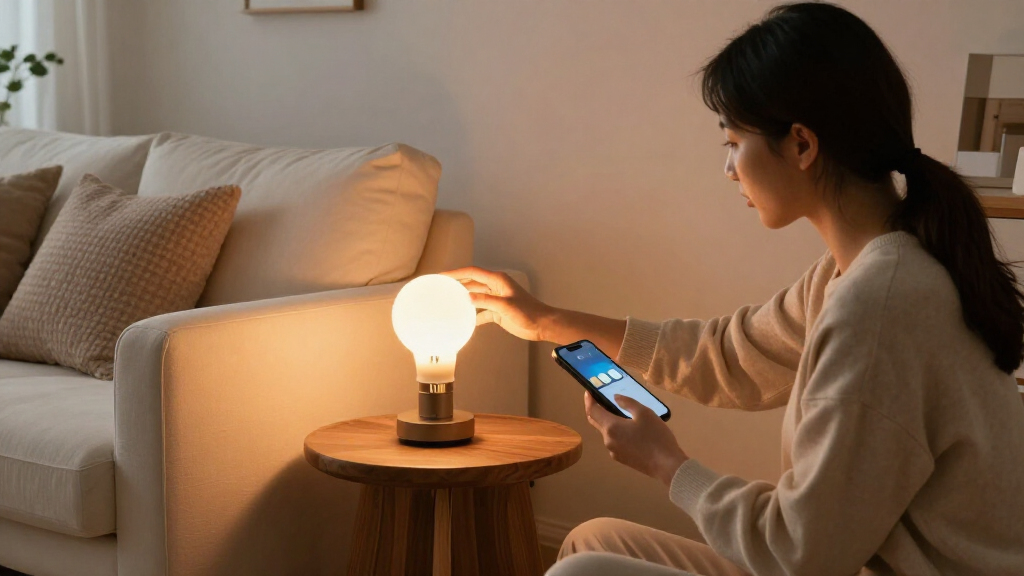

Choosing a smart lighting kit is less about whether an app can turn on a bulb and more about how well the system fits your home as it grows. Hub-based kits connect bulbs through a dedicated bridge or controller; Wi-Fi kits connect each compatible bulb or accessory directly to your wireless router. Both can support schedules, remote control, and voice assistants, but they make different tradeoffs in setup, network load, and advanced features.

Give the gift of listening to the book lover on your list
- Choose a 1-, 3-, 6- or 12-month membership
- They pick the audiobooks they love
- Easy to send by email
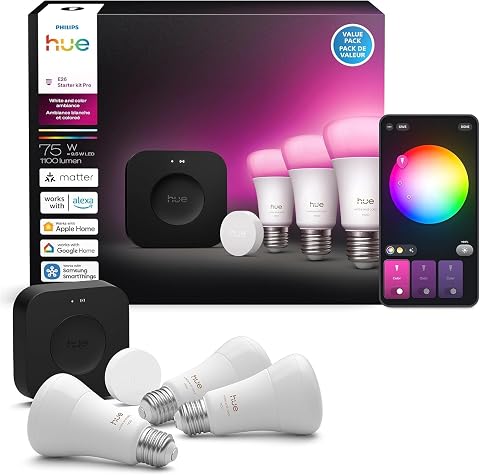
Philips Hue Starter Kit: Bridge Pro + 3 A19 E26 Smart Bulbs + Button
- ✔ Included: Hue Bridge Pro, smart button, three A19 E26 bulbs
- ✔ Light type: LED, White and Color Ambiance
- ✔ Color control: Tunable white and 16 million colors
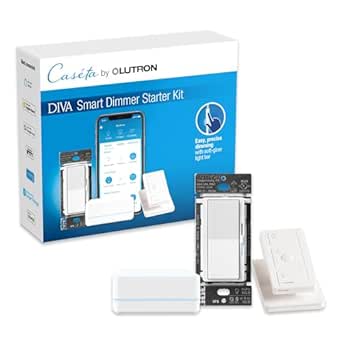
Lutron Caseta Diva Smart Dimmer Starter Kit
- ✔ Included: Diva dimmer, Pico remote, Pico pedestal, smart hub
- ✔ Control type: Wall dimmer, app, remote, voice
- ✔ Bulb requirement: Compatible existing dimmable bulbs

dreame LED Floor Lamp, RGB Color Changing with 70 Effects
- ✔ Lamp type: Freestanding LED floor lamp
- ✔ Included: Lamp components, control box, power adapter, assembly hardware
- ✔ Light control: RGB and white, 24 segments
A hub-based kit is usually the stronger choice for several rooms, frequent automations, or a home where lights should respond reliably together. A Wi-Fi kit is appealing when you want a few smart bulbs with minimal extra hardware and a lower starting cost. Product features vary by brand, so check support for your preferred assistants, dimmers, switches, and smart home standards before buying. The comparison below focuses on the usual differences between these two approaches.
At a Glance
| Criteria | Hub-based smart lighting kits | Wi-Fi smart lighting kits | Winner |
|---|---|---|---|
| Initial cost | Often costs more because a bridge or hub is included or required. | Often cheaper to start, especially for a small number of bulbs. | B |
| Setup | Adds a hub setup step, then bulbs can often be paired centrally. | Usually straightforward, but each device must join the Wi-Fi network. | B |
| Reliability at scale | Typically handles multiple lights and coordinated control more consistently. | Can work well in small setups; performance depends on router and device design. | A |
| Automation and control | Often offers deeper schedules, grouped scenes, and sensor integrations. | Covers common schedules and voice commands, with advanced features varying by brand. | A |
| Network impact | Bulbs commonly communicate through the hub, reducing direct Wi-Fi connections. | Each bulb or device may add a connection to the router. | A |
| Compatibility and expansion | May offer broad accessories and smart home integrations; varies by brand. | Simple to add compatible bulbs, but the brand or platform can limit choices. | Depends |
| Best fit | Multi-room systems and users who value dependable routines. | A few lights, renters, and shoppers prioritizing a low-friction start. | Depends |
Philips Hue Starter Kit: Bridge Pro + 3 A19 E26 Smart Bulbs + Button
For shoppers who want a real starting point for connected lighting, Hue combines a hub, three color bulbs, and a physical button in one kit. That matters because the bulbs can serve several lamps or fixtures with E26 sockets, while the Bridge Pro provides a base for adding more Hue lights and accessories. The included button gives household members a direct way to control the setup without relying on a phone every time.Its advantage over the dreame lamp is coverage and expandability: Hue can put tunable white and color in multiple sockets, whereas dreame focuses its 24 segments and effects on one freestanding lamp. Compared with Lutron, Hue changes the bulbs themselves, giving us color options that a conventional dimmer controlling existing bulbs does not offer. The Bridge Pro is described as supporting 150-plus lights and 50-plus accessories, so this kit is the clearest choice for a system we expect to build out.The tradeoff is that Hue is a bulb-based system, so it is not a whole-home switch replacement. It needs suitable E26 fixtures, and the supplied product information does not establish that every existing fixture or bulb type is compatible. Some advanced features, including MotionAware and Hue Sync, depend on the Bridge and broader Hue setup; they are not simply extra bulbs in the box. Buyers who only need a dramatic accent light in one corner may find dreame more focused, while buyers who want to smarten existing wired fixtures should look at Lutron.
Pros:
- Includes Bridge Pro, three A19 E26 color bulbs, and a customizable smart button.
- Supports tunable warm-to-cool white and full-color lighting.
- Bridge Pro is specified for 150-plus lights and 50-plus accessories.
- Lists compatibility with Apple Home, Alexa, Google, and Samsung SmartThings.
Cons:
- Requires compatible E26 bulb sockets and does not itself replace wall switches.
- Some advertised automation and sync capabilities rely on the Bridge and a wider Hue setup.
Best for: Households starting a multi-room color and tunable-white bulb system who have E26 fixtures and want a hub with room to expand.
Not ideal for: Buyers who want to control existing hardwired fixtures without changing their bulbs, or who only want one freestanding effects lamp.
Bottom line: We recommend Hue as the most complete starting kit here for buyers building a flexible, expandable bulb-based lighting system.
“We recommend Hue as the most complete starting kit here for buyers building a flexible, expandable bulb-based lighting system.”
Lutron Caseta Diva Smart Dimmer Starter Kit
If the goal is to make familiar ceiling or room fixtures smarter without swapping every bulb, Lutron Caseta takes the switch-based route. The kit includes a Diva dimmer, smart hub, Pico remote, and pedestal. Its key distinction from Hue is that it controls compatible existing dimmable lighting through the wall switch; Hue instead puts smart features inside its included bulbs. For a room where the fixture and its everyday wall control matter more than color effects, that can be a better fit.The Pico remote adds a useful control point without requiring another wired switch location, and Lutron says it can be placed on a nightstand or mounted with the appropriate adapter. The product also lists schedules, scenes, timers, geofencing, and smart-away features through its app. Its hub is described as working without Wi-Fi, which makes this the standout option in this group for buyers prioritizing a dedicated lighting-control setup. Compatibility is broad on the listing, including Apple Home, Alexa, Google Home, Ring, and Sonos.There are meaningful limits. The kit is centered on dimming compatible existing bulbs, not adding color or tunable-white bulbs; Hue is the better match for those effects. Installation means replacing a wall switch, even though the product says no neutral wire is required, so buyers uncomfortable with switch work should choose Hue bulbs or the freestanding dreame lamp. The wallplate is sold separately, and the supplied specs list a 150 W LED limit. This is a targeted fixture-control kit rather than the most visually expressive lighting package.
Pros:
- Controls compatible existing dimmable bulbs without replacing them with smart bulbs.
- Includes hub, Diva dimmer, Pico remote, and pedestal.
- No neutral wire is required according to the product description.
- Lists support for Apple Home, Alexa, Google Home, Ring, and Sonos.
Cons:
- Requires replacing a wall switch, so installation is less plug-and-play than Hue or dreame.
- Does not provide the included color and tunable-white lighting range of Hue.
- Wallplate is sold separately, and LED load is limited to 150 W.
Best for: Homeowners or renters with permission to replace a switch who want app, voice, and remote dimming for compatible existing fixtures.
Not ideal for: Buyers seeking color-changing bulbs, a no-wiring installation, or a kit that adds multiple lamps out of the box.
Bottom line: We would choose Caseta when reliable, physical dimming of existing fixtures matters more than adding color bulbs or accent effects.
“We would choose Caseta when reliable, physical dimming of existing fixtures matters more than adding color bulbs or accent effects.”
dreame LED Floor Lamp, RGB Color Changing with 70 Effects
The dreame lamp is the most specialized pick: it turns one corner of a room into a color and ambient-light feature, with 24 independently controlled segments, preset effects, and a music-sync mode. Unlike Hue’s three separate bulbs, this is a complete freestanding fixture supplied with its base, poles, connectors, screws, and power adapter. That means we can add visible color without replacing bulbs or touching a wall switch, although assembly and floor space are part of the deal.Its listed support for Matter, Alexa, and Google Home gives it a route into common smart home controls. The app’s DIY modes and effects are a better match for gaming, movies, or parties than Lutron’s fixture dimmer, which is designed to make ordinary lighting easier to control. The product description also lists adjustable white from 2700 K to 6500 K and a broad beam, giving it some everyday ambient-light potential alongside its effects.As a kit for smart home lighting, though, its scope is narrower. It supplies one lamp rather than a set of bulbs, a hub, or a lighting-control system, so it will not make ceiling fixtures smart or expand room by room in the same way Hue can. Buyers who want dependable control of existing switched fixtures should compare Lutron, and those who want a growing bulb system should favor Hue. The listing also has inconsistent brightness claims: the title says 1200 lumens, while the details say 1800 lumens. We would not base a brightness decision on that figure without confirming it.
Pros:
- 24 independently controlled segments support multicolor effects.
- Includes music sync and more than 70 preset effects, according to the listing.
- Lists Matter, Alexa, and Google Home compatibility.
- Freestanding form avoids changing bulbs or replacing a wall switch.
Cons:
- One lamp offers less room-to-room coverage than Hue’s three-bulb starter kit.
- Does not control existing ceiling fixtures or other lights.
- Brightness is inconsistently listed as 1200 lumens in the title and 1800 lumens in details.
Best for: People who want one freestanding smart accent light for a living room, bedroom, gaming space, or media setup.
Not ideal for: Buyers building a multi-room lighting kit, controlling hardwired fixtures, or needing clearly verified brightness specifications.
Bottom line: We see dreame as a focused accent-light pick for effects in one room, rather than a foundation for whole-home smart lighting.
“We see dreame as a focused accent-light pick for effects in one room, rather than a foundation for whole-home smart lighting.”
As an Amazon Associate we earn from qualifying purchases.
Key Differences
The central tradeoff is where the system’s complexity lives. A hub-based kit asks you to install and maintain one extra controller, but that controller coordinates the lights and can support a richer set of scenes, sensors, or other accessories. This can pay off when a household has many smart lights or expects to add more over time. Wi-Fi kits avoid a separate hub, making the first few bulbs easier and often less costly to install. Their simplicity can fade as the device count grows, particularly if the router or app ecosystem becomes a constraint.
Reliability and features depend on the specific products, wireless environment, and software support. A hub does not guarantee every light will respond instantly, and a well-designed Wi-Fi kit may be entirely adequate for a bedroom or living room. The practical distinction is that hub-based systems are usually built to coordinate a broader lighting setup, while Wi-Fi kits optimize for a quick, direct connection. Before choosing, verify whether lights remain usable with wall switches, what happens during an internet outage, and whether the exact model supports the assistants and accessories you plan to use.
Value depends on scale. For two or three bulbs, paying extra for a hub may buy features you never use. For a whole-home setup, the extra controller can be worthwhile if its reliability, automation options, and accessory support prevent a piecemeal system later. Compare the full kit and any required accessories, not just the per-bulb price.
Detailed Comparison
Initial cost (Wi-Fi smart lighting kits wins — moderate)
Wi-Fi usually wins on the upfront price for a small setup because it avoids a separate hub. The gap is moderate: a starter kit with several bulbs can narrow it, and prices vary widely by brand. If you need just a couple of smart lights, the hub’s extra cost may not return much practical benefit. For a larger system, compare the cost of the complete setup, including any required bridge, dimmer, or sensor.
Setup (Wi-Fi smart lighting kits wins — minor)
Wi-Fi has the easier first step: connect each bulb to power, pair it in the app, and join it to the network. Hub-based kits require setting up the controller and linking it to the router before pairing lights. That makes Wi-Fi the minor winner for a handful of bulbs. For a larger installation, a central pairing flow can make the hub approach easier to manage once the initial setup is complete.
Reliability at scale (Hub-based smart lighting kits wins — moderate)
Hub-based kits usually have the advantage when many lights need to respond together, especially across multiple rooms. The hub manages communication rather than asking every bulb to rely directly on the router, though actual performance depends on the products and the home’s layout. This is a moderate advantage for a growing system. With only a few lights and a capable router, Wi-Fi may perform just as well in ordinary use.
Automation and control (Hub-based smart lighting kits wins — moderate)
Hub-based kits often support more detailed scenes, schedules, grouped actions, and sensor-triggered routines. Wi-Fi kits commonly cover the basics, such as timers and voice commands, but advanced functions differ considerably between brands. The hub has a moderate edge for people who want lights to coordinate with occupancy, time of day, or other smart home devices. If you only need app control and a bedtime schedule, the difference may be minor.
Network impact (Hub-based smart lighting kits wins — minor)
A hub-based system generally keeps many bulbs from connecting directly to the home Wi-Fi network, which can be helpful when the installation gets large. Wi-Fi bulbs add individual devices to the router, though modern routers can handle many connections and actual limits vary. This is a minor advantage in a small apartment and a more meaningful one in a home with many connected devices. Check the router’s capacity and the bulb maker’s connection requirements.
Compatibility and expansion (moderate difference)
Neither approach wins across all brands. Hub-based kits may provide a wider range of matching switches, sensors, and lighting accessories, while Wi-Fi bulbs can be easy to add when they share the app or platform you already use. Both can have ecosystem limits. The difference is moderate for shoppers planning to expand: check named assistant and smart home platform support, accessory availability, and whether the brand supports local control before purchasing.
Hub-based smart lighting kits: Pros and Cons
Pros:
- More suitable for coordinating lighting across multiple rooms.
- Often supports richer scenes, sensors, and automation routines.
- Can reduce the number of bulbs connecting directly to Wi-Fi.
- May offer a broader range of matched lighting accessories.
Cons:
- Requires a hub or bridge and an extra setup step.
- Often costs more at the start.
- Features and compatibility depend on the specific brand and hub.
Wi-Fi smart lighting kits: Pros and Cons
Pros:
- Usually the cheapest way to make a few bulbs smart.
- No separate controller is needed.
- Straightforward to add lights individually.
Cons:
- Each bulb may add another device to the Wi-Fi network.
- Advanced automation and accessory support can be limited by the brand.
- A large setup may be harder to manage than a centralized system.
Who Should Choose What
Choose Hub-based smart lighting kits if:
- You are outfitting several rooms or expect to keep adding lights and accessories.
- You want coordinated scenes, sensor-triggered routines, or more detailed automation.
- You prefer to keep numerous bulbs from connecting directly to your Wi-Fi network.
Choose Wi-Fi smart lighting kits if:
- You want smart lighting in just a few fixtures and want to keep upfront costs low.
- You prefer to avoid installing a separate controller.
- Your main needs are app control, voice commands, and basic schedules.
Skip both if: Skip both if you need a lighting system guaranteed to keep working through outages or with existing wall switches without checking product behavior; compare manual control, local operation, and backup options for the exact kit first.
Value for Money
Pay more for a hub-based kit when you will use its coordination, automation, or expansion options. For a whole-home installation, the added controller can be worthwhile if it supports the accessories and routines you intend to use. Wi-Fi is better value when a few bulbs meet your needs: you avoid paying for hardware and capabilities that may sit unused. Compare total kit costs and ongoing compatibility, since the lowest per-bulb price may not be the lowest cost for a complete system.
Final Verdict
For most shoppers starting with one room, choose a Wi-Fi kit: it costs less, avoids a separate controller, and covers the everyday basics. Choose a hub-based kit if you are planning multiple rooms, care about coordinated automations, or expect to add sensors and switches. The biggest deciding factor is scale. Paying for a hub makes sense when its added control will serve the whole lighting system; for a few bulbs, Wi-Fi is the more practical buy.
Frequently Asked Questions
Do Wi-Fi smart bulbs need a hub?
Most Wi-Fi smart bulbs connect directly to a router and do not require a separate hub. Check the model’s requirements, since some kits include or depend on a bridge for certain features.
Are hub-based lighting kits more reliable?
They are often better suited to larger installations and coordinated control, but reliability depends on the hub, bulbs, network layout, and software. A small Wi-Fi setup can work reliably too.
Can a smart lighting kit work without internet?
It depends on the product. Some systems retain local controls or schedules when internet access is down, while remote app access and voice services may stop working. Check the maker’s outage guidance before buying.
Is a hub worth the extra cost?
Usually when you plan to control many lights or use accessories and more involved automations. For a few bulbs and basic schedules, the extra cost is harder to justify.
Black Friday Picks

De'Longhi Rivelia Fully Automatic Espresso Machine with Milk Frother, Black
As an affiliate, we earn on qualifying purchases.